Lesson 4: Episode guests tool
⏱️ Timebox: ~16 minutes · Starting branch:
lesson-3-end· Finished branch:lesson-4-end
Requirements tracker
✅ Transcribe podcast audio · ✅ Generate a summary and show notes · ✅ Cross-link mentioned episodes · ⬜ Validate guest details
Objective
Fix the last bug from Lesson 2. The show notes call the guests "Sebastian" and "Lottie", because speech-to-text writes what it hears. The correct spellings, Sebastiaan Janssen and Lotte Pitcher, only exist in the client's CRM.
You'll write your first tool: a C# class the model can ask Umbraco AI to run (Lecture 5). get_episode_guests reads
the guest emails off the episode, looks them up in the CRM, and hands the canonical names back to the model. Then you'll
allow both chat calls to use it. By the end, all four boxes on the tracker are ticked.
What you'll change
src/TheRabbitHole.Core/Tools/PodcastScope.cs(new): a tool scope that groups our podcast toolssrc/TheRabbitHole.Core/Tools/GetEpisodeGuestsTool.cs(new): the tool and its arguments recordsrc/TheRabbitHole.Core/PodcastEpisodeTranscriber.cs: allow the tool on both chat calls, and tell the model to use it- Backoffice: no configuration this time. You'll just regenerate episode 5's summary and show notes.
Steps
Step 1: Stop the site and meet the "CRM"
Press Ctrl+C to stop the site.
Open src/TheRabbitHole.Core/Integrations/HubSpot/HubSpotGuestClient.cs. It's been in the repo since init: it's the
client's existing HubSpot integration. There's nothing to change, but take a quick look:
- It's a stand-in. The real client would call HubSpot's CRM search API
(
POST https://api.hubapi.com/crm/v3/objects/contacts/search). This one answers from a small in-memory contact list, so you don't need a HubSpot account. Its public surface matches the real client, so the code you write today can't tell the difference. - The lookup key is the guest's email. That's why you entered
sebastiaan.janssen@example.comandlotte.pitcher@example.comin the episode's Guests field in Lesson 2. - You'll call one method. It returns a
GuestResultfor each contact it finds, with the canonicalFirstNameandLastName, aBio, and social and website links:
    public async Task<IReadOnlyList<GuestResult>> SearchByEmailsAsync(
        IReadOnlyList<string> emails,
        CancellationToken ct)
It's already registered for dependency injection in src/TheRabbitHole.Core/UmbracoBuilderExtensions.cs, so you can
inject it straight into your tool's constructor:
        // HubSpot CRM client (Integrations/HubSpot) — looks up guest bios + socials by email
        builder.Services.AddOptions<HubSpotOptions>()
            .BindConfiguration(HubSpotOptions.SectionName);
        builder.Services.AddHttpClient<HubSpotGuestClient>();
Why a tool and not another context, like Lesson 3? A CRM is big and private, and we only need two people from it. A tool lets the model look up exactly what it needs, at the moment it needs it.
Step 2: Add a tool scope
Every tool belongs to a scope, a named group of related tools. Scopes are how tool permissions are granted: in Lesson 5 you'll give an agent the whole Podcast scope in one go, instead of picking tools one by one.
Create a new file src/TheRabbitHole.Core/Tools/PodcastScope.cs (the Tools folder doesn't exist yet, so create that too)
and add:
using Umbraco.AI.Core.Tools.Scopes;

namespace TheRabbitHole.Core.Tools;

// A tool scope groups related tools so permissions can be granted to the whole group at once.
[AIToolScope("podcast", Icon = "icon-mic", Domain = "Podcast")]
public sealed class PodcastScope : AIToolScopeBase;
What's happening:
"podcast"is the scope's ID. Tools join the scope withScopeId = "podcast".IconandDomaincontrol how the scope is shown and grouped in the backoffice. You'll see it on the agent's Governance tab in Lesson 5.- There's no class body.
AIToolScopeBasereads everything from the attribute, and Umbraco discovers the class at startup, just like your resource type in Lesson 3.
Step 3: Build the get_episode_guests tool
A tool has two parts: an arguments record (what the model must send you) and a tool class (what you do with it). You'll build it up in four small steps.
3a. Scaffold the tool
Create a new file src/TheRabbitHole.Core/Tools/GetEpisodeGuestsTool.cs and add:
using System.ComponentModel;
using TheRabbitHole.Core.Integrations.HubSpot;
using Umbraco.AI.Core.Tools;
using Umbraco.Cms.Core.Services;
using Umbraco.Extensions;

namespace TheRabbitHole.Core.Tools;

public sealed record GetEpisodeGuestsArgs(
    [property: Description("The Umbraco content key (GUID) of the podcast episode.")]
    Guid EpisodeKey);

public sealed class GetEpisodeGuestsTool : AIToolBase<GetEpisodeGuestsArgs>
{
    private readonly IContentService _contentService;
    private readonly HubSpotGuestClient _hubspot;

    public GetEpisodeGuestsTool(IContentService contentService, HubSpotGuestClient hubspot)
    {
        _contentService = contentService;
        _hubspot = hubspot;
    }

    public override string Description => "TODO";

    protected override Task<object> ExecuteAsync(
        GetEpisodeGuestsArgs args,
        CancellationToken cancellationToken = default)
    {
        throw new NotImplementedException();
    }
}
What's happening:
GetEpisodeGuestsArgsis what the model must supply. Umbraco AI turns this record into a JSON schema and sends it with the request, so the model knows the tool takes one GUID. The[Description]is prompt guidance: it tells the model which GUID to send. ([property: …]puts the attribute on the record's generated property, which is where the schema generator looks.)AIToolBase<GetEpisodeGuestsArgs>does the plumbing. When the model calls the tool, Umbraco AI deserialises the JSON arguments into your record and callsExecuteAsyncwith it.- The constructor is ordinary dependency injection:
IContentServiceto read the episode, and theHubSpotGuestClientfrom Step 1. DescriptionandExecuteAsyncare placeholders for now. A couple of the usings are only needed later.
3b. Give it an ID and a scope
Add the [AITool] attribute directly above the class declaration:
[AITool("get_episode_guests", "Get Episode Guests", ScopeId = "podcast")]
public sealed class GetEpisodeGuestsTool : AIToolBase<GetEpisodeGuestsArgs>
What's happening:
"get_episode_guests"is the tool's ID. It's the name the model uses to call the tool, and the name you'll use to allow it in Step 4."Get Episode Guests"is its display name in the backoffice.ScopeId = "podcast"puts it in the scope from Step 2. Without it, the tool lands in a scope calledgeneral.- Discovered isn't the same as allowed. With the attribute in place, Umbraco AI finds the tool at startup. But no chat call can use it until you allow it explicitly, by ID. That's a deliberate safe default (Lecture 5): you don't want every tool in the system offered to every prompt.
Warning
The attribute is required, not decoration. AIToolBase reads the ID and scope from it, and throws
"… is missing required [AITool] attribute" when Umbraco creates the tool if it isn't there. The same goes for
[AIToolScope] on PodcastScope.
3c. Write the description (it's a prompt!)
Replace the placeholder Description property with:
    public override string Description =>
        "Returns the authoritative guest details (canonical name spelling, bio, and social links including " +
        "Twitter/X, LinkedIn, Bluesky, Mastodon, website) for a podcast episode. " +
        "Call this whenever you need to refer to a guest by name or reference their socials — " +
        "episode transcripts often misspell names, so always resolve via this tool using the episode's content key.";
What's happening: this text goes to the model alongside the schema, and it's how the model decides whether and when to call the tool. Notice it covers what the tool returns ("authoritative", "canonical name spelling"), when to call it ("whenever you need to refer to a guest by name"), and why ("transcripts often misspell names"). Write tool descriptions like a brief for a colleague, not like an XML doc comment.
3d. Implement ExecuteAsync
ExecuteAsync comes in three parts. It won't compile until you've added all three. That's expected.
Part 1: load and check the episode. Replace the whole ExecuteAsync method with:
    protected override async Task<object> ExecuteAsync(
        GetEpisodeGuestsArgs args,
        CancellationToken cancellationToken = default)
    {
        var episode = _contentService.GetById(args.EpisodeKey);
        if (episode is null)
            return new { Found = false, Message = $"No content found for key {args.EpisodeKey}." };

        if (!episode.ContentType.Alias.Equals("podcastEpisode", StringComparison.OrdinalIgnoreCase))
            return new { Found = false, Message = $"Content {args.EpisodeKey} is not a podcastEpisode." };
    }
What's happening:
- The method is now
async, because Part 3 awaits the CRM. - The model chose the key, so check it. If it's wrong, return an error object instead of throwing. The model reads the result like any other and can react to "that isn't an episode". Throw instead, and the model learns nothing useful about what went wrong. The Umbraco AI docs recommend this pattern.
- Whatever you return is serialised to JSON and sent back to the model. Anonymous objects are fine.
Part 2: read the guest emails. Directly below the second if, add:
        // The episode stores guest email addresses in a repeatable text string, one per line.
        var emails = (episode.GetValue<string>("guests")?.Split('\n') ?? [])
            .Select(e => e.Trim())
            .Where(e => !string.IsNullOrWhiteSpace(e))
            .ToList();

        if (emails.Count == 0)
            return new { Found = true, EpisodeName = episode.Name, Guests = Array.Empty<GuestResult>() };
What's happening:
guestsis a Repeatable textstrings property, stored as one value per line. So we split on newlines and trim (which also removes any stray\r).- No emails means no guests. That's a valid answer, not an error, so return
Found = truewith an empty list. The model then knows not to credit anyone.
Part 3: ask the CRM and shape the result. Directly below that, just before the method's closing brace, add:
        var guests = await _hubspot.SearchByEmailsAsync(emails, cancellationToken);

        var missing = emails
            .Where(e => !guests.Any(g => string.Equals(g.Email, e, StringComparison.OrdinalIgnoreCase)))
            .ToList();

        return new
        {
            Found = true,
            EpisodeName = episode.Name,
            Guests = guests,
            MissingEmails = missing,
        };
What's happening:
- One CRM call looks up all the emails at once.
Guestscarries the fullGuestResultrecords (canonical names, bios, links), and the model picks what it needs.MissingEmailslists any emails the CRM doesn't know. Saying so explicitly beats leaving the model to guess.
Full file: GetEpisodeGuestsTool.cs
using System.ComponentModel;
using TheRabbitHole.Core.Integrations.HubSpot;
using Umbraco.AI.Core.Tools;
using Umbraco.Cms.Core.Services;
using Umbraco.Extensions;

namespace TheRabbitHole.Core.Tools;

public sealed record GetEpisodeGuestsArgs(
    [property: Description("The Umbraco content key (GUID) of the podcast episode.")]
    Guid EpisodeKey);

[AITool("get_episode_guests", "Get Episode Guests", ScopeId = "podcast")]
public sealed class GetEpisodeGuestsTool : AIToolBase<GetEpisodeGuestsArgs>
{
    private readonly IContentService _contentService;
    private readonly HubSpotGuestClient _hubspot;

    public GetEpisodeGuestsTool(IContentService contentService, HubSpotGuestClient hubspot)
    {
        _contentService = contentService;
        _hubspot = hubspot;
    }

    public override string Description =>
        "Returns the authoritative guest details (canonical name spelling, bio, and social links including " +
        "Twitter/X, LinkedIn, Bluesky, Mastodon, website) for a podcast episode. " +
        "Call this whenever you need to refer to a guest by name or reference their socials — " +
        "episode transcripts often misspell names, so always resolve via this tool using the episode's content key.";

    protected override async Task<object> ExecuteAsync(
        GetEpisodeGuestsArgs args,
        CancellationToken cancellationToken = default)
    {
        var episode = _contentService.GetById(args.EpisodeKey);
        if (episode is null)
            return new { Found = false, Message = $"No content found for key {args.EpisodeKey}." };

        if (!episode.ContentType.Alias.Equals("podcastEpisode", StringComparison.OrdinalIgnoreCase))
            return new { Found = false, Message = $"Content {args.EpisodeKey} is not a podcastEpisode." };

        // The episode stores guest email addresses in a repeatable text string, one per line.
        var emails = (episode.GetValue<string>("guests")?.Split('\n') ?? [])
            .Select(e => e.Trim())
            .Where(e => !string.IsNullOrWhiteSpace(e))
            .ToList();

        if (emails.Count == 0)
            return new { Found = true, EpisodeName = episode.Name, Guests = Array.Empty<GuestResult>() };

        var guests = await _hubspot.SearchByEmailsAsync(emails, cancellationToken);

        var missing = emails
            .Where(e => !guests.Any(g => string.Equals(g.Email, e, StringComparison.OrdinalIgnoreCase)))
            .ToList();

        return new
        {
            Found = true,
            EpisodeName = episode.Name,
            Guests = guests,
            MissingEmails = missing,
        };
    }
}
Step 4: Let both chat calls use the tool
The tool exists, but nothing is allowed to use it yet. Open src/TheRabbitHole.Core/PodcastEpisodeTranscriber.cs. In
ProcessManualAsync, find the summary block (it starts with var summary =) and replace the whole block with:
        var summary = content.GetValue<string>("summary") ?? string.Empty;
        if (string.IsNullOrWhiteSpace(summary))
        {
            string summaryPrompt =
                "You are a podcast producer. Given a raw transcript, write a concise 1–2 sentence summary of the episode " +
                "suitable for a listing card. Respond with plain text only — no markdown, no HTML, no quotes.\n" +
                "\n" +
                "IMPORTANT do NOT rely on names that appear in the transcript. Use the get_episode_guests tool to " +
                "resolve guest names and details based on the episode's content key, and refer to guests by their " +
                "canonical names from the tool results.\n" +
                "\n" +
                "## Episode Context\n" +
                $"Episode Key: {contentKey} (use this to query the get_episode_guests tool)";

            var summaryResponse = await chat.GetChatResponseAsync(
                b => b.WithAlias("podcast-episode-summary")
                    .WithProfile("podcast-profile")
                    .WithTools("get_episode_guests"),
                [
                    new ChatMessage(ChatRole.System, summaryPrompt),
                    new ChatMessage(ChatRole.User, transcript)
                ], ct);

            summary = summaryResponse.Text;
            content.SetValue("summary", summary);
            contentHasChanged = true;
        }
Then find the show notes block directly below it (it starts with var showNotes =) and replace the whole block with:
        var showNotes = content.GetValue<string>("showNotes") ?? string.Empty;
        if (IsRichTextEmpty(showNotes, jsonSerializer))
        {
            string showNotesPrompt =
                "You are a podcast producer. Given a raw transcript, write HTML show notes for publication: " +
                "a short overview paragraph, a bulleted list of key topics, and any resources or guests mentioned. " +
                "Respond with valid HTML only — no markdown, no code fences, no <html>/<body> wrappers.\n" +
                "\n" +
                "If a previous episode is mentioned, include it and link it to the show, but only if you know the URL.\n" +
                "\n" +
                "IMPORTANT do NOT rely on names that appear in the transcript. Use the get_episode_guests tool to " +
                "resolve guest names and details based on the episode's content key, and refer to guests by their " +
                "canonical names from the tool results.\n" +
                "\n" +
                "## Episode Context\n" +
                $"Episode Key: {contentKey} (use this to query the get_episode_guests tool)";

            var showNotesResponse = await chat.GetChatResponseAsync(
                b => b.WithAlias("podcast-episode-show-notes")
                    .WithProfile("podcast-profile")
                    .WithTools("get_episode_guests"),
                [
                    new ChatMessage(ChatRole.System, showNotesPrompt),
                    new ChatMessage(ChatRole.User, transcript)
                ], ct);

            showNotes = showNotesResponse.Text;
            content.SetValue("showNotes", showNotes);
            contentHasChanged = true;
        }
What changed, in both blocks:
.WithTools("get_episode_guests")allows this call to use the tool, by ID. Umbraco AI sends the tool's schema and description with the request. When the model asks for the tool, Umbraco AI runs yourExecuteAsyncand feeds the result back. That loop can go round several times inside oneGetChatResponseAsynccall.- The "IMPORTANT" instruction tells the model not to trust names from the transcript. The tool's description says the same thing; saying it in the prompt as well makes the model more reliable about actually calling the tool.
- The Episode Key line now says what the key is for. Remember the
## Episode Contextsection from Lesson 2? This is where it pays off: the model needs that key to call the tool.
Note
WithTools isn't in the official docs yet; it's in the Umbraco AI source. The documented alternative is to build ad hoc
functions with AIFunctionFactory from Microsoft.Extensions.AI and pass them in ChatOptions.Tools.
Step 5: Run it and regenerate episode 5
dotnet run --project src/TheRabbitHole.Web
- In the backoffice, open Content → Home → Episodes → Community, AI, and the Umbraco Way.
- Clear the Summary and Show Notes fields. Keep the Transcript. It's correct, it's the slowest and most expensive step, and the code skips transcription when a transcript already exists.
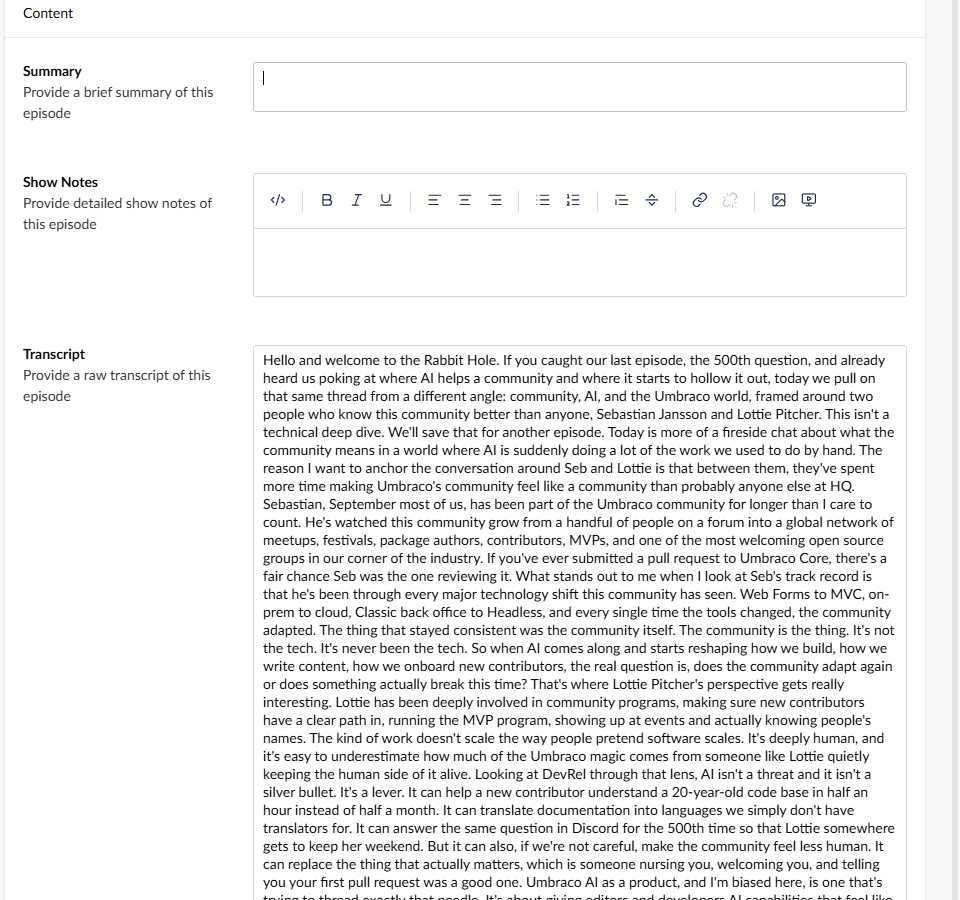
- Click Save.
- Wait for the Podcast episode processed toast. It takes about 10 seconds, a little longer on some providers: two chat calls, each with a quick trip to the CRM.
- Refresh the page (F5) to load the new values.
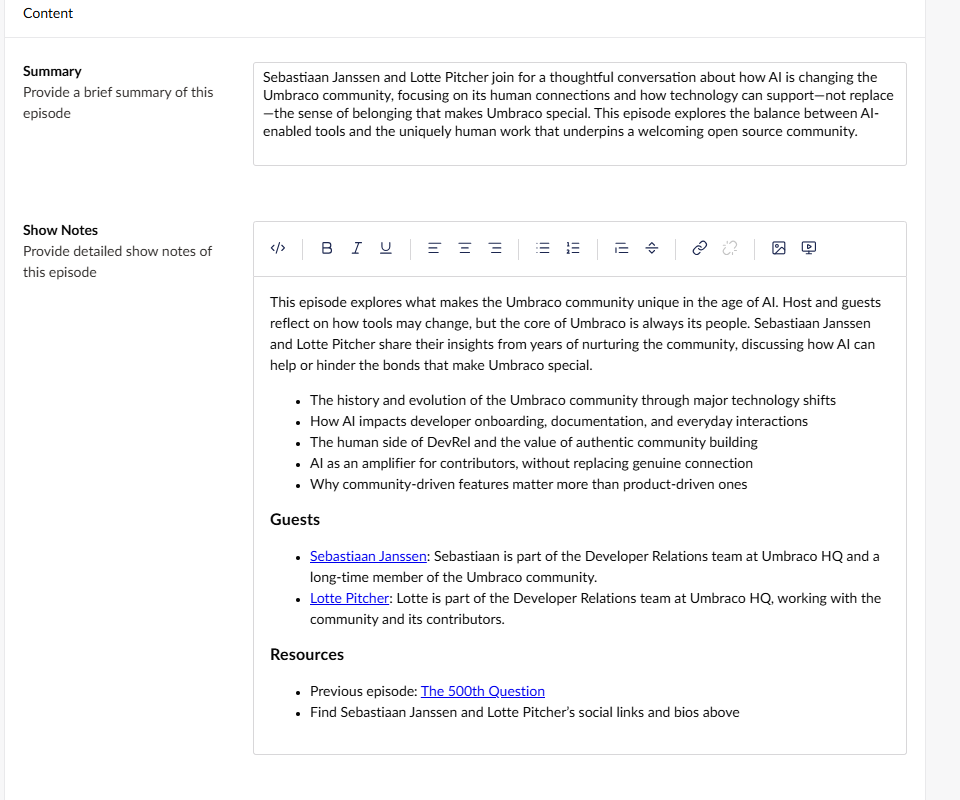
Both the summary and the show notes now spell the guests Sebastiaan Janssen and Lotte Pitcher. The show notes probably credit them with a short bio and a link to their page, too. That's data from the CRM, not from the transcript. And the link to The 500th Question from Lesson 3 is still there.
✅ Checkpoint
- ⬜ The site starts without errors.
- ⬜ The new summary and show notes spell the guests Sebastiaan Janssen and Lotte Pitcher, not Sebastian or Lottie.
- ⬜ Any guest bios or links in the show notes match the CRM data (you'll see it in the log below).
- ⬜ The show notes still link to The 500th Question. Lesson 3's context is still doing its job.
- ⬜ The transcript is unchanged. It may still say "Sebastian" and "Lottie", and that's fine: it's a faithful record of what the audio sounds like.
That's the fourth box ticked. 🎉
🔍 Under the hood
Open AI → Logs. The two newest entries are the chat calls you just triggered, both Inline-Chat. Find the show
notes call by its Feature ID (the same ID it had in Lessons 2 and 3, 733e4fb6… when we built this workshop) or by its Tokens:
it has the most output tokens. Click its timestamp to open Audit Log Details.
Look at Tokens first. When we built this workshop, the show notes call's input jumped from about 1,300 tokens in Lesson 3 to about 3,100 now. The transcript didn't get longer. But the tool's schema and description, and later the tool's result, are now part of the conversation, and the conversation goes to the model twice: once when it asks for the tool, and again when it writes the notes with the result. You pay for all of it like any other text.
The Prompt looks like Lesson 3's, plus the new "IMPORTANT" instruction. The interesting part is the Response. Instead of just HTML, it now records the whole exchange:
[tool_call:…] get_episode_guests({"episodeKey":"…"}): the model asking you to run the tool, passing the episode key from the prompt.[tool:…] -> {"Found":true,…}: your tool's JSON result, with"FirstName":"Sebastiaan","LastName":"Janssen"and"FirstName":"Lotte","LastName":"Pitcher", plus bios and links, and an emptyMissingEmailslist.[assistant]and the final HTML, written with the names from step 2.
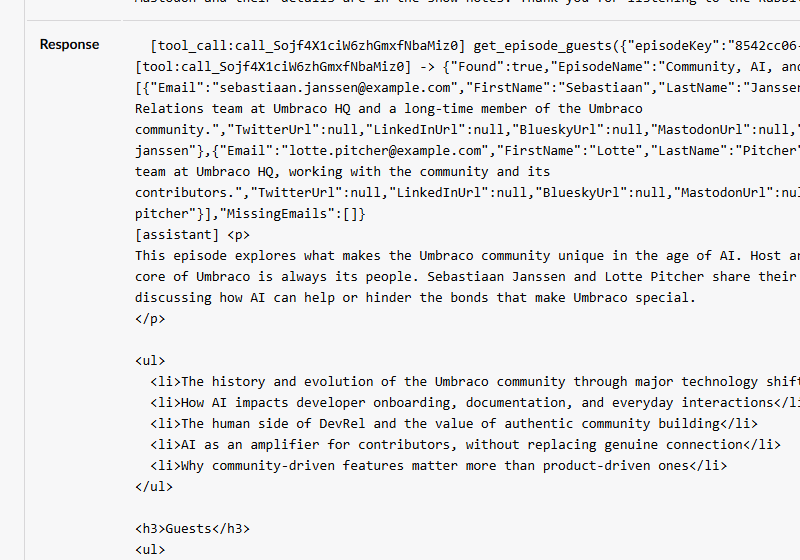
Look closely at the tool result: MastodonUrl is null for both guests. The CRM has no Mastodon profiles for them at
all, which confirms that any Mastodon links you saw in Lesson 2 were made up.
That's the loop from Lecture 5, written down for you: prompt and tool list → the model asks for a tool → your C# runs →
the result goes back → the model finishes. It's all one GetChatResponseAsync call; Umbraco AI's function-invoking
middleware runs the loop for you.
Now open the summary entry (the other Inline-Chat entry, 7df279d3… when we built this workshop). Same pattern, which means the CRM
was asked for the same two guests twice per episode. The first stretch goal fixes that. Its input tokens went up by
about the same amount: together, the two calls now use roughly 6,000 input tokens per episode. Keep that number in mind
for Lesson 5.
🧯 Troubleshooting
The names are still wrong, and the log shows no tool call
- Check that both chat calls have
.WithTools("get_episode_guests"), and that the ID matches the[AITool]attribute exactly. - Check the "IMPORTANT" instruction made it into both prompts.
- Make sure you restarted the site after changing the code.
- LLMs are non-deterministic, so a model occasionally writes without calling the tool. Clear the Summary and Show Notes and save again.
"AI tool with ID '…' is not registered" in the terminal
You'll find it under Failed to process podcast episode. The ID passed to WithTools doesn't match any tool Umbraco
discovered. The message lists the IDs it does know, so compare them:
- a typo in
WithTools(...)or in the[AITool(...)]attribute - the
[AITool]attribute is missing - the site wasn't restarted after adding the tool
An error says "… is missing required [AITool] attribute"
The tool class has no [AITool] attribute. Add it (Step 3b). If the message mentions AIToolScopeAttribute, check the
attribute on PodcastScope (Step 2).
The tool result has an empty Guests list
The episode's Guests field is empty, so there's nothing to look up. Add sebastiaan.janssen@example.com and
lotte.pitcher@example.com as two separate entries (it's one of the Lesson 2 steps), clear the Summary and Show Notes, and
Save.
If the result lists an address under MissingEmails, it's probably a typo. The stand-in CRM only knows the example
addresses.
Build errors
AIToolBase<>orAIToolnot found: addusing Umbraco.AI.Core.Tools;AIToolScopeBaseorAIToolScopenot found: addusing Umbraco.AI.Core.Tools.Scopes;HubSpotGuestClientorGuestResultnot found: addusing TheRabbitHole.Core.Integrations.HubSpot;GetValue<string>not found: addusing Umbraco.Extensions;- "not all code paths return a value": you haven't added all three parts of
ExecuteAsyncyet.
Both new files use the namespace TheRabbitHole.Core.Tools.
No toast appears
🆘 Stuck?
Jump to the finished state of this lesson. Stop the site first (Ctrl+C), then:
git stash -u
git checkout lesson-4-end
dotnet run --project src/TheRabbitHole.Web
The branch includes the code and the backoffice configuration for this lesson (it's in the site's database), so you can carry straight on with the next lesson. Your API key lives in user-secrets, so it comes with you.
🚀 Stretch goals
- Cache the CRM lookup. Both chat calls ask for the same guests. Inject Umbraco's
AppCachesand check_cache.RuntimeCache.Get(key)before calling the CRM, then store the result with_cache.RuntimeCache.Insert(key, () => result, TimeSpan.FromMinutes(5)). Hint: you might reach forAppCaches.RequestCache, but our tool runs inside a background service where there's no HTTP request, so a request cache never gets a hit. Use the runtime cache with an expiry instead. - Credit the guests properly. Ask for an "About our guests" section with each guest's bio and website link in the show notes prompt. Hint: the data is already in the tool result, so this is a prompt-only change.
- Prove the tool matters. Temporarily remove
.WithTools("get_episode_guests")from the show notes call, clear the show notes and save. Hint: the model can't call a tool it wasn't offered, so the transcript's spellings creep back in, despite the "IMPORTANT" line. Put it back afterwards.