Lesson 5: The Podcast Producer agent
⏱️ Timebox: ~20 minutes · Starting branch:
lesson-4-end· Finished branch:lesson-5-end
Requirements tracker
✅ Transcribe podcast audio · ✅ Generate a summary and show notes · ✅ Cross-link mentioned episodes · ✅ Validate guest details
Objective
All four requirements are met. From here on, the requirements stay the same and we change how they're met.
Right now we are the orchestrator: three calls, three prompts, in an order we hard-coded, with an if for every case we
thought of. In this lesson you'll replace all of that with one goal-oriented agent (Lecture 6). The Podcast Producer
gets a set of tools and a description of what "done" looks like, then works out the steps itself, including skipping work
that's already done.
You'll write the two tools that matter most: get_episode (the agent's eyes) and transcribe_episode (the key
insight: wrap speech-to-text in a tool, and a chat model gains a capability it doesn't have). You'll paste in the rest,
then create the agent in the backoffice.
What you'll change
src/TheRabbitHole.Web/TheRabbitHole.Web.csprojandsrc/TheRabbitHole.Core/TheRabbitHole.Core.csproj: add the agent packagessrc/TheRabbitHole.Core/Tools/EpisodeToolBase.csandSaveEpisodePropertyToolBase.cs(new, pasted): shared base classessrc/TheRabbitHole.Core/Tools/GetEpisodeTool.csandTranscribeEpisodeTool.cs(new, written step by step)src/TheRabbitHole.Core/Tools/SaveEpisodeSummaryTool.cs,SaveEpisodeShowNotesTool.csandPublishEpisodeReportTool.cs(new, pasted)src/TheRabbitHole.Core/PodcastEpisodeTranscriber.cs: run the agent instead of the hand-written stepssrc/TheRabbitHole.Core/wwwroot/App_Plugins/TheRabbitHole/lang/en.js(optional polish): a friendly label for the Podcast scope- Backoffice → AI → Agents (under Add-ons): the Podcast Producer agent
Steps
Step 1: Add the agent packages
Stop the site (Ctrl+C). Then, from the repo root:
dotnet add src/TheRabbitHole.Web package Umbraco.AI.Agent --version 17.1.7
dotnet add src/TheRabbitHole.Core package Umbraco.AI.Agent.Core --version 17.1.7
It's the same split as Lesson 1. The web project gets the full package: the Agents backoffice UI, its API and its
database tables. Our class library only needs Umbraco.AI.Agent.Core, which contains IAIAgentService. We aren't
installing the Copilot package, so our agent can only be run from code. That's exactly what we want.
Step 2: Paste in the shared base classes
Every podcast tool starts the same way: take an episode key, load the episode, and back out politely if the key is wrong. Two base classes keep that in one place.
Create a new file src/TheRabbitHole.Core/Tools/EpisodeToolBase.cs and add:
using Umbraco.AI.Core.Tools;
using Umbraco.Cms.Core.Models;
using Umbraco.Cms.Core.Services;

namespace TheRabbitHole.Core.Tools;

public abstract class EpisodeToolBase<TArgs> : AIToolBase<TArgs>
    where TArgs : class
{
    protected IContentService ContentService { get; }

    protected EpisodeToolBase(IContentService contentService)
    {
        ContentService = contentService;
    }

    protected (IContent? Episode, object? Error) GetEpisodeOrError(Guid episodeKey)
    {
        var episode = ContentService.GetById(episodeKey);
        if (episode is null)
            return (null, new { Success = false, Message = $"No content found for key {episodeKey}." });

        if (!episode.ContentType.Alias.Equals("podcastEpisode", StringComparison.OrdinalIgnoreCase))
            return (null, new { Success = false, Message = $"Content {episodeKey} is not a podcastEpisode." });

        return (episode, null);
    }
}
Create a new file src/TheRabbitHole.Core/Tools/SaveEpisodePropertyToolBase.cs and add:
using Umbraco.Cms.Core.Security;
using Umbraco.Cms.Core.Services;
using Umbraco.Extensions;

namespace TheRabbitHole.Core.Tools;

public abstract class SaveEpisodePropertyToolBase<TArgs> : EpisodeToolBase<TArgs>
    where TArgs : class
{
    private readonly IBackOfficeSecurityAccessor _securityAccessor;
    protected SaveEpisodePropertyToolBase(IContentService contentService,
        IBackOfficeSecurityAccessor securityAccessor) : base(contentService)
    {
        _securityAccessor = securityAccessor;
    }

    protected abstract string PropertyAlias { get; }

    protected abstract (Guid EpisodeKey, object? Value) Extract(TArgs args);

    protected override Task<object> ExecuteAsync(TArgs args, CancellationToken cancellationToken = default)
    {
        var (episodeKey, value) = Extract(args);
        var (episode, error) = GetEpisodeOrError(episodeKey);
        if (episode is null)
            return Task.FromResult(error!);

        var currentUser = _securityAccessor.BackOfficeSecurity?.CurrentUser;

        episode.SetValue(PropertyAlias, value);
        ContentService.Save(episode, currentUser?.Id);
        return Task.FromResult<object>(new { Success = true });
    }
}
What's happening:
EpisodeToolBase<TArgs>:GetEpisodeOrErrorreturns either the episode or an error object. It never throws. It's the same pattern you used inget_episode_guestsin Lesson 4, now reusable. This matters even more in an agent: an exception gives the model nothing useful to work with, while{ Success = false, Message = "… is not a podcastEpisode." }is something it can read, reason about and recover from.SaveEpisodePropertyToolBase<TArgs>is a template for "save one field". A subclass says which property to write (PropertyAlias) and how to get the key and value out of its arguments (Extract). The base class loads, sets and saves. It attributes the save to the current backoffice user when there is one. In our background service there isn't, so Umbraco uses its default.- Both classes are abstract and have no
[AITool]attribute, so they aren't tools themselves.
Step 3: Write GetEpisodeTool, the agent's eyes
An agent can't adapt to what it can't see. This tool shows it the episode's current state, so it can decide what still needs doing.
3a. Scaffold the tool
Create a new file src/TheRabbitHole.Core/Tools/GetEpisodeTool.cs and add:
using System.ComponentModel;
using Umbraco.AI.Core.Tools;
using Umbraco.Cms.Core.Services;
using Umbraco.Extensions;

namespace TheRabbitHole.Core.Tools;

public sealed record GetEpisodeArgs(
    [property: Description("The Umbraco content key (GUID) of the podcast episode.")]
    Guid EpisodeKey);

public sealed class GetEpisodeTool(IContentService contentService)
    : EpisodeToolBase<GetEpisodeArgs>(contentService)
{
    public override string Description => "TODO";

    protected override Task<object> ExecuteAsync(
        GetEpisodeArgs args,
        CancellationToken cancellationToken = default)
    {
        throw new NotImplementedException();
    }
}
What's happening:
- The arguments record has the same shape as Lesson 4's: one episode key, with a
[Description]telling the model which GUID to send. - This time the class uses a primary constructor and passes
IContentServicestraight toEpisodeToolBase, which keeps it in theContentServiceproperty.
3b. Give it an ID and a scope
Add the [AITool] attribute directly above the class declaration:
[AITool("get_episode", "Get Episode", ScopeId = "podcast")]
public sealed class GetEpisodeTool(IContentService contentService)
    : EpisodeToolBase<GetEpisodeArgs>(contentService)
It's in the same podcast scope as get_episode_guests, so granting the scope to the agent in Step 8 includes it
automatically.
3c. Write the description
Replace the placeholder Description property with:
    public override string Description =>
        "Return the current state of a podcast episode: name, whether audio is attached, and the current transcript, " +
        "summary, show notes, and guest emails. Call at the start of a run to see which fields still need work.";
Notice the last sentence: "Call at the start of a run to see which fields still need work." That's how the agent learns its first move from the tool itself, rather than from a "step 1" in its instructions. (With our model we ended up reinforcing it in the instructions too. You'll see why in Step 8.)
3d. Implement ExecuteAsync
Replace the whole ExecuteAsync method with:
    protected override Task<object> ExecuteAsync(
        GetEpisodeArgs args,
        CancellationToken cancellationToken = default)
    {
        var (episode, error) = GetEpisodeOrError(args.EpisodeKey);
        if (episode is null)
            return Task.FromResult(error!);

        var guestEmails = (episode.GetValue<string>("guests")?.Split('\n') ?? [])
            .Select(e => e.Trim())
            .Where(e => !string.IsNullOrWhiteSpace(e))
            .ToArray();

        return Task.FromResult<object>(new
        {
            Success = true,
            Name = episode.Name,
            HasAudio = !string.IsNullOrWhiteSpace(episode.GetValue<string>("audioFile")),
            Transcript = episode.GetValue<string>("transcript"),
            Summary = episode.GetValue<string>("summary"),
            ShowNotes = episode.GetValue<string>("showNotes"),
            GuestEmails = guestEmails,
        });
    }
What's happening:
- There's nothing to await, so the method isn't
asyncand returns withTask.FromResult. - A bad key returns the error object from the base class, unchanged.
HasAudiois a yes/no rather than a file path. The model needs to know whether it can transcribe, not where the file lives.- It returns the full transcript, because the agent needs it to write the summary and show notes. It's also a big reason agent runs cost more, as you'll see in Analytics.
Full file: GetEpisodeTool.cs
using System.ComponentModel;
using Umbraco.AI.Core.Tools;
using Umbraco.Cms.Core.Services;
using Umbraco.Extensions;

namespace TheRabbitHole.Core.Tools;

public sealed record GetEpisodeArgs(
    [property: Description("The Umbraco content key (GUID) of the podcast episode.")]
    Guid EpisodeKey);

[AITool("get_episode", "Get Episode", ScopeId = "podcast")]
public sealed class GetEpisodeTool(IContentService contentService)
    : EpisodeToolBase<GetEpisodeArgs>(contentService)
{
    public override string Description =>
        "Return the current state of a podcast episode: name, whether audio is attached, and the current transcript, " +
        "summary, show notes, and guest emails. Call at the start of a run to see which fields still need work.";

    protected override Task<object> ExecuteAsync(
        GetEpisodeArgs args,
        CancellationToken cancellationToken = default)
    {
        var (episode, error) = GetEpisodeOrError(args.EpisodeKey);
        if (episode is null)
            return Task.FromResult(error!);

        var guestEmails = (episode.GetValue<string>("guests")?.Split('\n') ?? [])
            .Select(e => e.Trim())
            .Where(e => !string.IsNullOrWhiteSpace(e))
            .ToArray();

        return Task.FromResult<object>(new
        {
            Success = true,
            Name = episode.Name,
            HasAudio = !string.IsNullOrWhiteSpace(episode.GetValue<string>("audioFile")),
            Transcript = episode.GetValue<string>("transcript"),
            Summary = episode.GetValue<string>("summary"),
            ShowNotes = episode.GetValue<string>("showNotes"),
            GuestEmails = guestEmails,
        });
    }
}
Step 4: Write TranscribeEpisodeTool, and give a chat model ears
The agent runs on the Podcast Profile, which is a chat model. It can't listen to audio. But it can call a tool that can. Wrap your Lesson 2 speech-to-text code in a tool, and the agent gains a capability its model doesn't have. Tools can wrap other AI capabilities, not just databases and APIs.
4a. Scaffold the tool
Create a new file src/TheRabbitHole.Core/Tools/TranscribeEpisodeTool.cs and add:
using System.ComponentModel;
using Microsoft.Extensions.Logging;
using Umbraco.AI.Core.SpeechToText;
using Umbraco.AI.Core.Tools;
using Umbraco.Cms.Core.IO;
using Umbraco.Cms.Core.Security;
using Umbraco.Cms.Core.Services;
using Umbraco.Extensions;

namespace TheRabbitHole.Core.Tools;

public sealed record TranscribeEpisodeArgs(
    [property: Description("The Umbraco content key (GUID) of the podcast episode to transcribe.")]
    Guid EpisodeKey);

public sealed class TranscribeEpisodeTool : EpisodeToolBase<TranscribeEpisodeArgs>
{
    private const int PreviewLength = 300;

    private readonly MediaFileManager _mediaFileManager;
    private readonly IAISpeechToTextService _stt;
    private readonly IBackOfficeSecurityAccessor _securityAccessor;
    private readonly ILogger<TranscribeEpisodeTool> _logger;

    public TranscribeEpisodeTool(
        IContentService contentService,
        MediaFileManager mediaFileManager,
        IAISpeechToTextService stt,
        IBackOfficeSecurityAccessor securityAccessor,
        ILogger<TranscribeEpisodeTool> logger) : base(contentService)
    {
        _mediaFileManager = mediaFileManager;
        _stt = stt;
        _securityAccessor = securityAccessor;
        _logger = logger;
    }

    public override string Description => "TODO";

    protected override Task<object> ExecuteAsync(
        TranscribeEpisodeArgs args,
        CancellationToken cancellationToken = default)
    {
        throw new NotImplementedException();
    }
}
What's happening: the constructor asks for what Lesson 2's transcription block used, MediaFileManager to open the audio
file and IAISpeechToTextService to transcribe it. It also takes the security accessor (to attribute the save, as in the
base class) and a logger. PreviewLength comes into play in 4d.
4b. Give it an ID and a scope
Add the [AITool] attribute directly above the class declaration:
[AITool("transcribe_episode", "Transcribe Episode", ScopeId = "podcast")]
public sealed class TranscribeEpisodeTool : EpisodeToolBase<TranscribeEpisodeArgs>
4c. Write the description
Replace the placeholder Description property with:
    public override string Description =>
        "Transcribes the audio file attached to a podcast episode and saves the transcript onto the episode. " +
        "Returns an acknowledgement with the character count and a short preview — the full text is persisted " +
        "directly (podcast transcripts are too large to pass around as tool arguments). " +
        "Call get_episode afterwards if you need the full transcript to produce summary or show notes.";
What's happening: the description sets expectations about the result. It tells the model the tool saves the transcript itself and only returns a receipt, and where to get the full text. Without that last sentence, a model might mistake the 300-character preview for the whole transcript.
4d. Implement ExecuteAsync
This comes in two parts. It won't compile until you've added both.
Part 1: transcribe and save. Replace the whole ExecuteAsync method with:
    protected override async Task<object> ExecuteAsync(
        TranscribeEpisodeArgs args,
        CancellationToken cancellationToken = default)
    {
        var (episode, error) = GetEpisodeOrError(args.EpisodeKey);
        if (episode is null)
            return error!;

        var audioPath = episode.GetValue<string>("audioFile");
        if (string.IsNullOrWhiteSpace(audioPath))
            return new { Success = false, Message = "Episode has no audio file to transcribe." };

        _logger.LogInformation("Transcribing podcast episode {Id}", args.EpisodeKey);

        var currentUser = _securityAccessor.BackOfficeSecurity?.CurrentUser;

        await using var audio = _mediaFileManager.FileSystem.OpenFile(audioPath);
        var sttResponse = await _stt.TranscribeAsync(
            b => b.WithAlias("podcast-episode-transcription"),
            audio, cancellationToken);

        var transcript = sttResponse.Text ?? string.Empty;
        episode.SetValue("transcript", transcript);
        ContentService.Save(episode, currentUser?.Id);
    }
Recognise it? It's your Lesson 2 transcription block: the same OpenFile, the same TranscribeAsync, and the same
podcast-episode-transcription alias, so it shows up in the logs exactly as before. Two things are different. A missing
audio file returns an error object the agent can read, instead of silently returning. And the transcript is saved to the
episode straight away.
Part 2: answer with a receipt, not the transcript. Directly below ContentService.Save(episode, currentUser?.Id);,
add:
        var preview = transcript.Length <= PreviewLength
            ? transcript
            : transcript[..PreviewLength] + "…";

        return new
        {
            Success = true,
            CharacterCount = transcript.Length,
            Preview = preview,
        };
What's happening: design tool results around what the model needs to see. A transcript runs to tens of thousands of characters. If this tool returned it, it would sit in the conversation and be paid for again on every turn. Worse, the agent would then have to copy it back out as an argument to some "save transcript" tool: slow, expensive output tokens, and a chance for the model to "tidy it up". So the tool saves the transcript itself and returns a receipt: it worked, here's how long it is, and here's the first 300 characters so you can sanity-check the language and the episode.
Full file: TranscribeEpisodeTool.cs
using System.ComponentModel;
using Microsoft.Extensions.Logging;
using Umbraco.AI.Core.SpeechToText;
using Umbraco.AI.Core.Tools;
using Umbraco.Cms.Core.IO;
using Umbraco.Cms.Core.Security;
using Umbraco.Cms.Core.Services;
using Umbraco.Extensions;

namespace TheRabbitHole.Core.Tools;

public sealed record TranscribeEpisodeArgs(
    [property: Description("The Umbraco content key (GUID) of the podcast episode to transcribe.")]
    Guid EpisodeKey);

[AITool("transcribe_episode", "Transcribe Episode", ScopeId = "podcast")]
public sealed class TranscribeEpisodeTool : EpisodeToolBase<TranscribeEpisodeArgs>
{
    private const int PreviewLength = 300;

    private readonly MediaFileManager _mediaFileManager;
    private readonly IAISpeechToTextService _stt;
    private readonly IBackOfficeSecurityAccessor _securityAccessor;
    private readonly ILogger<TranscribeEpisodeTool> _logger;

    public TranscribeEpisodeTool(
        IContentService contentService,
        MediaFileManager mediaFileManager,
        IAISpeechToTextService stt,
        IBackOfficeSecurityAccessor securityAccessor,
        ILogger<TranscribeEpisodeTool> logger) : base(contentService)
    {
        _mediaFileManager = mediaFileManager;
        _stt = stt;
        _securityAccessor = securityAccessor;
        _logger = logger;
    }

    public override string Description =>
        "Transcribes the audio file attached to a podcast episode and saves the transcript onto the episode. " +
        "Returns an acknowledgement with the character count and a short preview — the full text is persisted " +
        "directly (podcast transcripts are too large to pass around as tool arguments). " +
        "Call get_episode afterwards if you need the full transcript to produce summary or show notes.";

    protected override async Task<object> ExecuteAsync(
        TranscribeEpisodeArgs args,
        CancellationToken cancellationToken = default)
    {
        var (episode, error) = GetEpisodeOrError(args.EpisodeKey);
        if (episode is null)
            return error!;

        var audioPath = episode.GetValue<string>("audioFile");
        if (string.IsNullOrWhiteSpace(audioPath))
            return new { Success = false, Message = "Episode has no audio file to transcribe." };

        _logger.LogInformation("Transcribing podcast episode {Id}", args.EpisodeKey);

        var currentUser = _securityAccessor.BackOfficeSecurity?.CurrentUser;

        await using var audio = _mediaFileManager.FileSystem.OpenFile(audioPath);
        var sttResponse = await _stt.TranscribeAsync(
            b => b.WithAlias("podcast-episode-transcription"),
            audio, cancellationToken);

        var transcript = sttResponse.Text ?? string.Empty;
        episode.SetValue("transcript", transcript);
        ContentService.Save(episode, currentUser?.Id);

        var preview = transcript.Length <= PreviewLength
            ? transcript
            : transcript[..PreviewLength] + "…";

        return new
        {
            Success = true,
            CharacterCount = transcript.Length,
            Preview = preview,
        };
    }
}
Step 5: Paste in the save and report tools
Three more tools, pasted as they are.
Create a new file src/TheRabbitHole.Core/Tools/SaveEpisodeSummaryTool.cs and add:
using System.ComponentModel;
using Umbraco.AI.Core.Tools;
using Umbraco.Cms.Core.Security;
using Umbraco.Cms.Core.Services;

namespace TheRabbitHole.Core.Tools;

public sealed record SaveEpisodeSummaryArgs(
    [property: Description("The Umbraco content key (GUID) of the podcast episode.")]
    Guid EpisodeKey,
    [property: Description("A plain-text summary suitable for a listing card. No markdown, no HTML, no quotes.")]
    string Summary);

[AITool("save_episode_summary", "Save Episode Summary", ScopeId = "podcast")]
public sealed class SaveEpisodeSummaryTool(IContentService contentService, IBackOfficeSecurityAccessor securityAccessor)
    : SaveEpisodePropertyToolBase<SaveEpisodeSummaryArgs>(contentService, securityAccessor)
{
    public override string Description =>
        "Persist a plain-text episode summary onto a podcast episode. The value must be plain text with no markdown, HTML, or surrounding quotes.";

    protected override string PropertyAlias => "summary";

    protected override (Guid EpisodeKey, object? Value) Extract(SaveEpisodeSummaryArgs args)
        => (args.EpisodeKey, args.Summary);
}
Create a new file src/TheRabbitHole.Core/Tools/SaveEpisodeShowNotesTool.cs and add:
using System.ComponentModel;
using Umbraco.AI.Core.Tools;
using Umbraco.Cms.Core.Security;
using Umbraco.Cms.Core.Services;

namespace TheRabbitHole.Core.Tools;

public sealed record SaveEpisodeShowNotesArgs(
    [property: Description("The Umbraco content key (GUID) of the podcast episode.")]
    Guid EpisodeKey,
    [property: Description("A valid HTML body fragment. No markdown, no code fences, no <html>/<body> wrappers.")]
    string ShowNotes);

[AITool("save_episode_show_notes", "Save Episode Show Notes", ScopeId = "podcast")]
public sealed class SaveEpisodeShowNotesTool(IContentService contentService, IBackOfficeSecurityAccessor securityAccessor)
    : SaveEpisodePropertyToolBase<SaveEpisodeShowNotesArgs>(contentService, securityAccessor)
{
    public override string Description =>
        "Persist HTML show notes onto a podcast episode. Input must be a valid HTML body fragment with no markdown, no code fences, and no <html>/<body> wrappers.";

    protected override string PropertyAlias => "showNotes";

    protected override (Guid EpisodeKey, object? Value) Extract(SaveEpisodeShowNotesArgs args)
        => (args.EpisodeKey, args.ShowNotes);
}
What's happening:
- Thanks to
SaveEpisodePropertyToolBase, each save tool is just a property alias and anExtract. - One tool per field. Models do better with small, clearly named tools than with one big
save_episodetool that takes everything. Notice where the formatting rules went: "plain text, no quotes" and "HTML fragment, no code fences" used to live in Lesson 2's prompts. Now they're in the argument descriptions, right where the model fills the values in.
Create a new file src/TheRabbitHole.Core/Tools/PublishEpisodeReportTool.cs and add:
using System.ComponentModel;
using Microsoft.AspNetCore.SignalR;
using Microsoft.Extensions.Logging;
using Umbraco.AI.Core.Tools;
using Umbraco.Cms.Core.Services;

namespace TheRabbitHole.Core.Tools;

public sealed record PublishEpisodeReportArgs(
    [property: Description("The Umbraco content key (GUID) of the episode you have just finished.")]
    Guid EpisodeKey,
    [property: Description("The final episode title.")]
    string EpisodeTitle,
    [property: Description("The 1–2 sentence plain-text summary you wrote for this episode.")]
    string Summary,
    [property: Description("Canonical guest names credited in the show notes. Empty array if no guests were mentioned.")]
    string[] GuestNames,
    [property: Description("Title of another episode of the show you linked to from the show notes, or null if none.")]
    string? RelatedEpisodeTitle);

// This tool exists as the agent's completion signal: calling it is the only way to report "episode ready"
// and deliver the structured report data to connected backoffice clients. It's hand-rolled plumbing — the
// kind of thing Umbraco.Automate would replace with a content-state workflow, leaving just the AI work here.
[AITool("publish_episode_report", "Publish Episode Report", ScopeId = "podcast")]
public sealed class PublishEpisodeReportTool : EpisodeToolBase<PublishEpisodeReportArgs>
{
    private readonly IHubContext<PodcastHub> _hub;
    private readonly ILogger<PublishEpisodeReportTool> _logger;

    public PublishEpisodeReportTool(
        IContentService contentService,
        IHubContext<PodcastHub> hub,
        ILogger<PublishEpisodeReportTool> logger) : base(contentService)
    {
        _hub = hub;
        _logger = logger;
    }

    public override string Description =>
        "File your production report once the episode is ready for publication. " +
        "Notifies connected backoffice clients that the episode has been processed and summarises what was produced. " +
        "Call exactly once, as the last thing you do, after transcript, summary, and show notes have all been saved.";

    protected override async Task<object> ExecuteAsync(
        PublishEpisodeReportArgs args,
        CancellationToken cancellationToken = default)
    {
        var (episode, error) = GetEpisodeOrError(args.EpisodeKey);
        if (episode is null)
            return error!;

        _logger.LogInformation(
            "Publishing episode report for {Id}: {Title} (guests: {GuestCount}, related: {Related})",
            args.EpisodeKey, args.EpisodeTitle, args.GuestNames.Length, args.RelatedEpisodeTitle ?? "none");

        await _hub.Clients.All.SendAsync(
            "episodeProcessed",
            args.EpisodeKey,
            args.EpisodeTitle,
            cancellationToken);

        return new { Success = true };
    }
}
What's happening:
- This is the agent's "I'm done" signal. The agent's instructions end with "publish an episode report", and this is how it does that. The description says "exactly once, as the last thing you do", so the ordering is described, not coded.
- The arguments make the agent file a structured report: the title, its summary, the guests it credited, and the episode it linked. The report is logged, so you can see what the agent thinks it did.
- It sends the same
episodeProcessedSignalR message thatProcessManualAsyncsends, so you get the same toast. In Lesson 6 you'll swap SignalR for an Umbraco notification that Automate can react to.
Step 6: Run the agent from PodcastEpisodeTranscriber
Open src/TheRabbitHole.Core/PodcastEpisodeTranscriber.cs. At the top, add one line to the usings,
using Umbraco.AI.Agent.Core.Agents;, directly below using Microsoft.Extensions.Logging;, so that part reads:
using Microsoft.Extensions.Logging;
using Umbraco.AI.Agent.Core.Agents;
using Umbraco.AI.Core.Chat;
Next, add this method directly below the ProcessManualAsync method (just above the IsRichTextEmpty comment):
    // Agent-driven processing: hands the episode to the `podcast-producer` agent, which orchestrates
    // transcription, guest resolution, summary, and show notes via the tools registered under the "podcast" scope.
    // The strategy difference vs. ProcessManualAsync: no step ordering in C#, no per-task prompts. The agent reads the
    // episode state, decides which artifacts are missing, and composes tool calls until the job is done.
    private async Task ProcessAgentAsync(Guid contentKey, CancellationToken ct)
    {
        using var scope = scopeFactory.CreateScope();
        var agentService = scope.ServiceProvider.GetRequiredService<IAIAgentService>();

        logger.LogInformation("Running podcast-producer agent for episode {Id}", contentKey);

        await agentService.RunAgentAsync(
            "podcast-producer",
            [new ChatMessage(ChatRole.User, $"Produce episode {contentKey}.")],
            cancellationToken: ct);

        // The agent fires the SignalR notification itself via the publish_episode_report tool —
        // nothing to do here after the run completes.
        logger.LogInformation("podcast-producer agent finished for episode {Id}", contentKey);
    }
What's happening:
- As in
ProcessManualAsync, we create a DI scope for this unit of work, because the background service itself is a singleton. RunAgentAsync("podcast-producer", …)looks the agent up by alias when it runs. Its instructions, profile and allowed tools live in the backoffice (Step 8), not in code.- The only message is "Produce episode {key}." It says which episode, not how.
- There's no save and no toast afterwards. The agent does both through its tools.
Finally, find the ProcessAsync method and replace it with:
    // The main processing logic: transcribe the audio, generate show notes, save to Umbraco, and notify clients via SignalR.
    private async Task ProcessAsync(Guid contentKey, CancellationToken ct)
    {
        // Lesson 5: hand the whole job to the agent instead of our hand-rolled steps.
        // await ProcessManualAsync(contentKey, ct);
        await ProcessAgentAsync(contentKey, ct);
    }
Note
We keep ProcessManualAsync so you can switch back and compare the two approaches. In a real project, you'd delete it.
Step 7 (optional): Give the Podcast scope a friendly label
The agent's Governance tab looks up localization keys for each tool scope. Without them, our scope shows up as its raw ID,
podcast, with no description. Replace the contents of
src/TheRabbitHole.Core/wwwroot/App_Plugins/TheRabbitHole/lang/en.js with:
// Backoffice localization for The Rabbit Hole.
export default {
    uaiToolScopeDomain: {
        podcast: "Podcast",
    },
    uaiToolScope: {
        podcastLabel: "Podcast",
        podcastDescription: "Operations for podcast episode production: transcription, guest lookup, and publishing helpers.",
    },
};
What's happening: uaiToolScope holds the scope's label and description (keys {scopeId}Label and
{scopeId}Description), and uaiToolScopeDomain labels the Domain = "Podcast" you set in Lesson 4. The file is
already registered as a backoffice localization in umbraco-package.json, so there's nothing else to wire up. Tools don't
need entries: they fall back to the name and description in their [AITool] attribute.
Step 8: Create the Podcast Producer agent
Tools first, agent second (Lecture 6): the Governance tab can only list tools that are compiled and registered. So start the site now:
dotnet run --project src/TheRabbitHole.Web
The first start takes a little longer while the Agent package creates its database tables. In the backoffice, the AI section's tree now has an Agents item under Add-ons.
Warning
Don't save an episode until you've created the agent. Every save of an episode with audio now runs the agent, and until it exists the run fails with "Agent with alias 'podcast-producer' not found."
8a. Create the agent
- Go to AI → Agents (under Add-ons) and click Create. There's no menu of agent types: a new standard agent opens straight away.
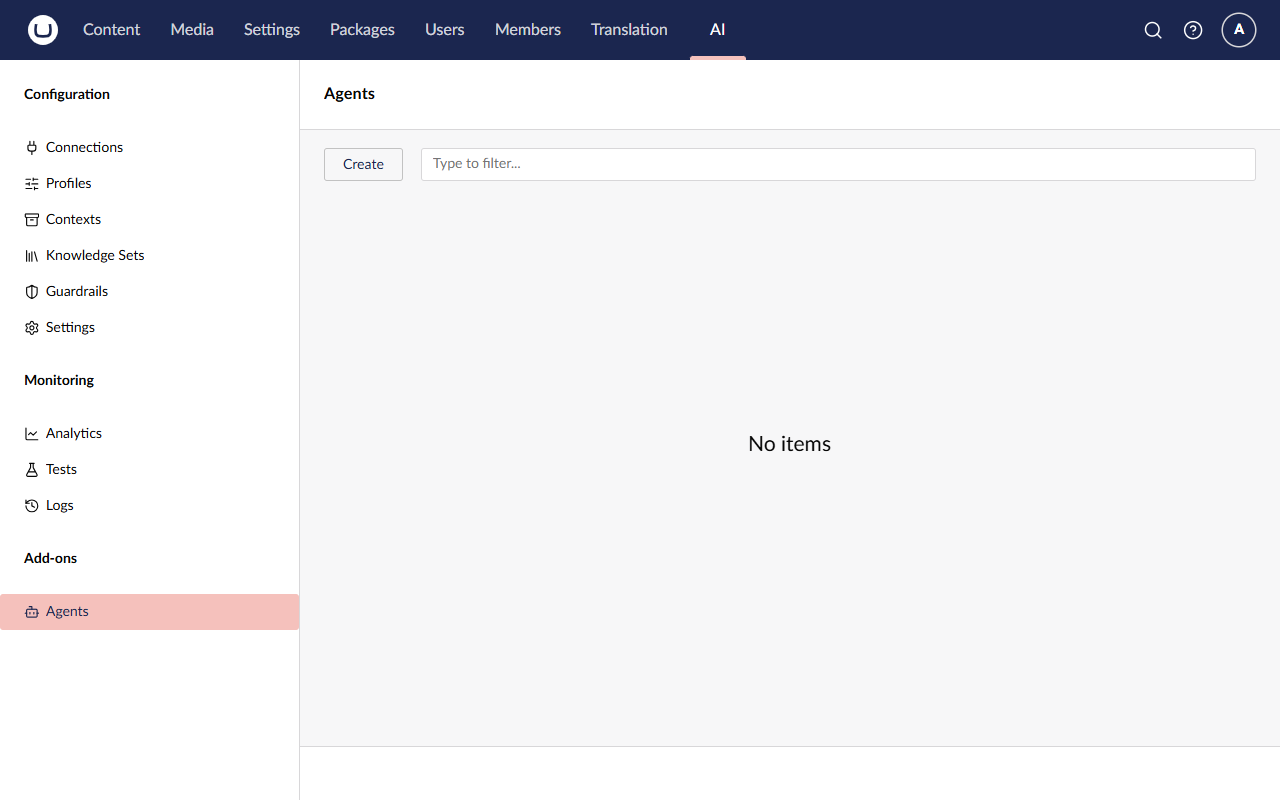
- In the header, enter the name
Podcast Producer. The alias fills in aspodcast-producer. Check it: the code looks the agent up by that alias. - Next to the name, make sure the Active/Inactive toggle is set to Active.
The editor has four tabs: Settings, Availability, Governance and Info. You'll fill in the first three.
8b. The Settings tab
- Description:
Specialist in podcast production - AI Profile: click + Add and choose Podcast Profile in the Select AI profile dialog. The agent uses the profile's model and its contexts, so Brand Voice and Podcast Metadata (with the real episode URLs) come along. Your Lesson 3 work carries straight over.
- Contexts: leave empty. The profile's contexts already apply.
- Instructions: a markdown editor. Paste the text below.
- Output Format (at the bottom of the tab): leave it as Text.
Warning
Select AI profile also lists the Transcriber Profile. Don't pick it. It's a speech-to-text profile, and an agent needs a chat model to reason and call tools. Choose Podcast Profile.
These instructions tell the agent who it is, what a finished episode looks like, and how to behave while it works. The How you work section at the end sets its ground rules (more on that below). Paste all of it:
You are the producer of The Rabbit Hole.

When a freshly recorded episode is handed to you, your job is to get it ready for publication. A publication-ready episode must have:

- a faithful transcript of the audio,
- a short summary that makes someone want to listen,
- publishable show notes that frame the conversation, highlight the key topics, and credit any guests.

You are meticulous with facts. Names, titles, URLs — if you are about to put one in writing, you resolve it against the
authoritative source first. Transcripts regularly misspell guest names. You never invent another episode of the show.

You treat every episode as a doorway to the rest of the show. Good show notes send listeners toward at least one
other episode that picks up what they just heard — always by real title and real URL, chosen because it
genuinely fits the thread.

When the episode is complete and ready for release, publish an episode report.

## How you work

You run unattended. Nobody will reply to you, so never ask for confirmation or announce what you are about to do. Keep working with your tools until the job is finished:

- Check the episode first and only do the work that is missing. Never re-transcribe an episode that already has a transcript.
- Save the summary and the show notes with their tools. Writing them in your reply does not save them.
- Finish by publishing the episode report. Your final reply only needs to confirm what you saved.
Notice what's missing: steps. There's no "first call get_episode, then…". The instructions say who the agent is, what a
publication-ready episode looks like, the standards it holds itself to (resolve names against the authoritative source;
never invent an episode), and what "done" means (publish an episode report). The how comes from the tool descriptions.
That's what lets the agent adapt: if a transcript already exists, "a faithful transcript" is already true, so it moves
on. Everything we hard-coded as if checks and prompt rules in Lessons 2–4 is now described as an outcome. Write
instructions like a brief for a capable colleague, not a script.
The How you work section isn't a script either. It's the ground rules you'd give a colleague who works alone: nobody will answer questions, don't redo work that's already done, a summary only counts once it's saved, and the report is the finish line.
Important
Why the extra section? Instructions aren't perfectly portable between models. The first part of these
instructions was written for Claude Sonnet, and works there as it is. When we built this workshop on GPT-4.1, the same
instructions made the agent do two things wrong. It called transcribe_episode even though the episode already had a transcript. And it ended
its turn with "Stand by for the summary and show notes" without saving anything. In a chat that would be fine, but
here the run simply ends, because nobody is there to reply. An agent that runs unattended needs an explicit "keep
going until the job is done" rule. The How you work section fixed both problems. The lesson to take home: whenever
you change an agent's model, test its instructions again.
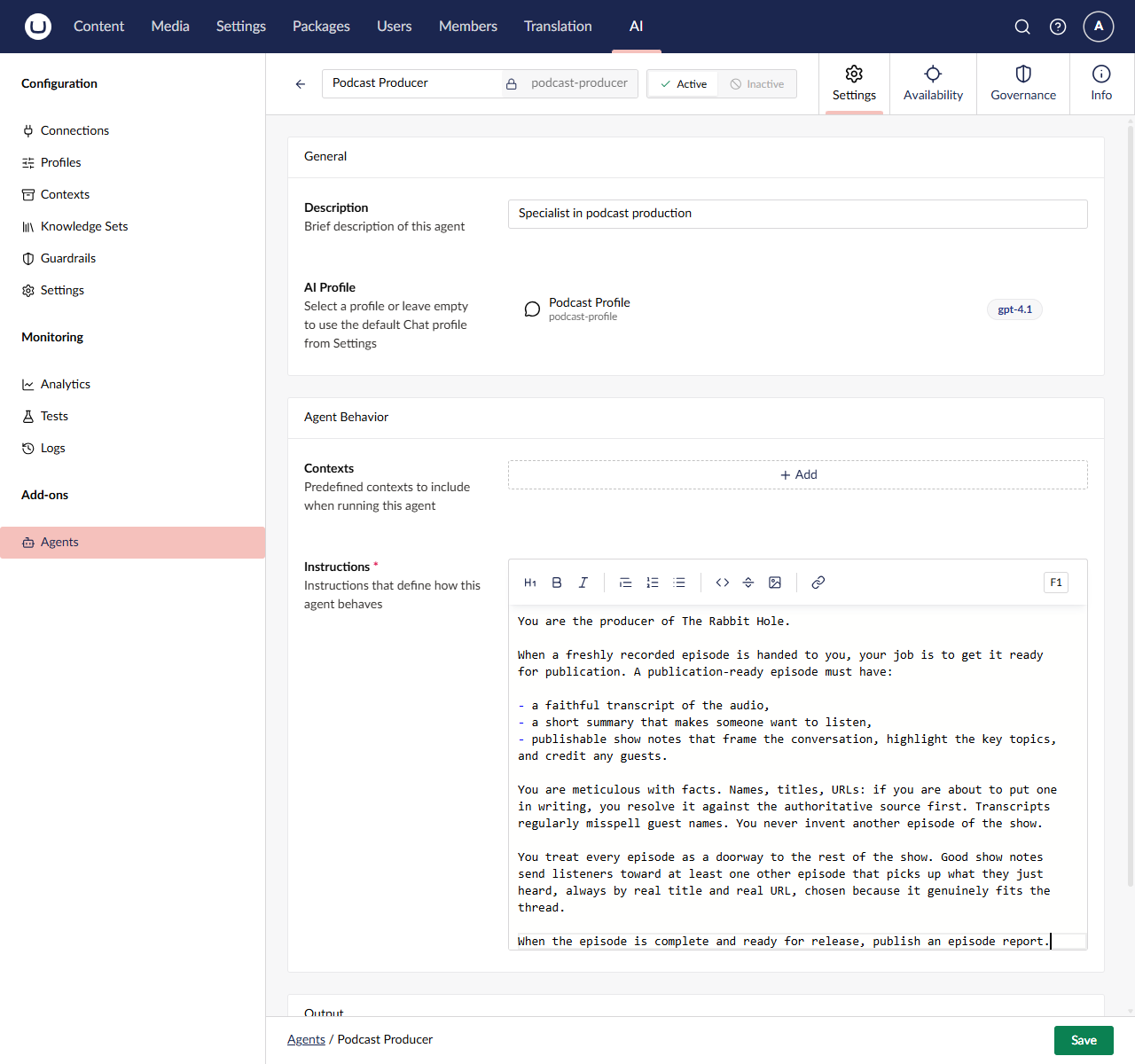
The screenshot shows the instructions before the How you work section was added. Yours ends with it.
8c. The Availability tab
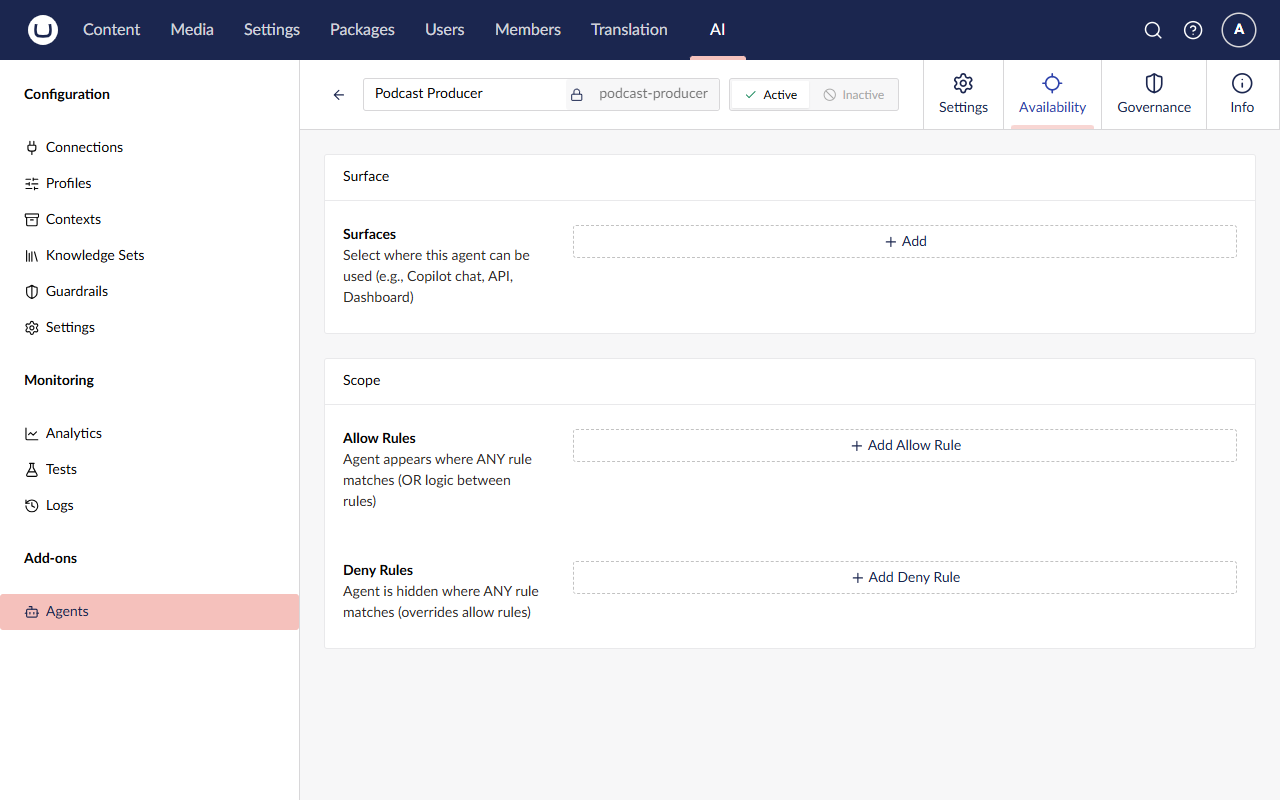
The Availability tab has two boxes: Surface, with the Surfaces list and its + Add button, and Scope, with Allow Rules and Deny Rules. Leave them all empty.
Surfaces decide where an agent can appear, such as the Copilot chat or Automate workflows. Running an agent from your own code doesn't need one. You'll add the Automations surface in Lesson 6, once Automate is installed.
8d. The Governance tab
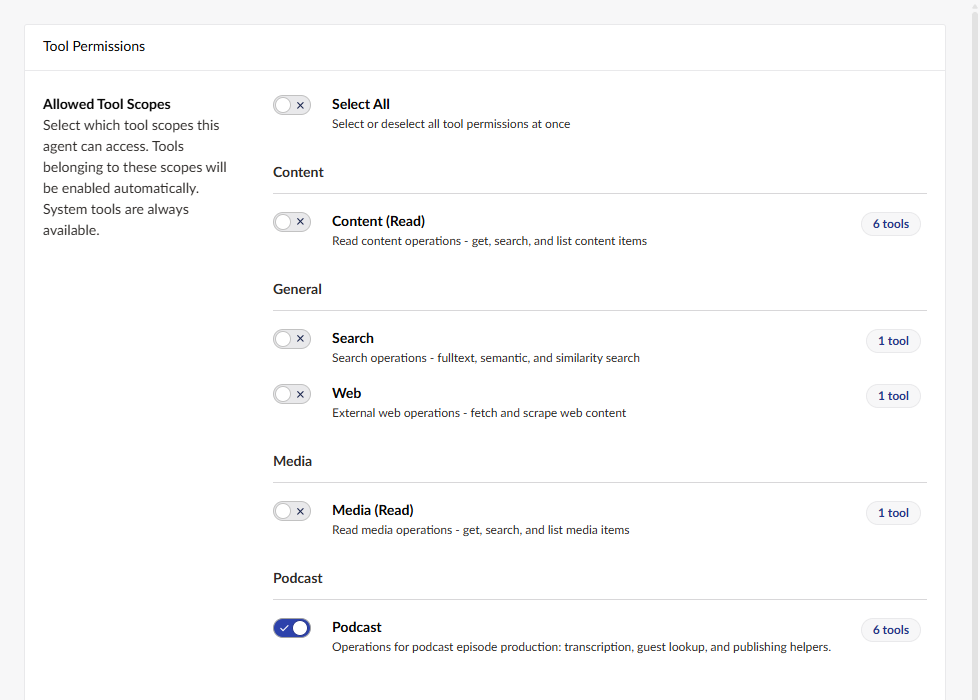
- Under Tool Permissions → Allowed Tool Scopes there's a toggle for each tool scope, grouped by domain: the built-in Content (Read), Search, Web and Media (Read) scopes, and at the bottom your own Podcast scope. It shows the label and description from Step 7, and a 6 tools badge.
- Switch Podcast on. Leave everything else on the tab as it is.
- Click Save.
Anything you don't grant is left out, so this agent can't use the built-in content, media, search or web tools. Least privilege is the default. The one exception is Umbraco AI's system tools: as the tab says, "System tools are always available." You'll spot one in the log shortly.
Step 9: Produce episode 5 with the agent
- Open Content → Home → Episodes → Community, AI, and the Umbraco Way.
- Clear Summary and Show Notes. Keep the Transcript again.
- Click Save.
- Wait for the Podcast episode processed toast. It's the same toast as in Lesson 2, because
publish_episode_reportsends the same SignalR message. It usually takes 10 to 30 seconds, depending on your provider: a little longer than Lesson 4, because the agent works in several turns. - Refresh the page (F5).
✅ Checkpoint
- ⬜ AI → Agents lists Podcast Producer (
podcast-producer, Active), and its Governance tab has the Podcast scope (6 tools) switched on. - ⬜ The instructions end with the How you work section.
- ⬜ After you save, the toast appears, and the summary and show notes are regenerated.
- ⬜ The guests are still Sebastiaan Janssen and Lotte Pitcher.
- ⬜ The show notes point listeners to another episode (most likely The 500th Question) by its real title and link. Where it appears and how it's worded will differ from run to run.
- ⬜ The transcript is unchanged. The agent didn't transcribe again.
🔍 Under the hood
Read the agent's conversation
Open AI → Logs. The whole agent run is one entry, with Feature Agent (not Inline-Chat) on the Podcast
Profile. The ID under the Feature name ends in a version, such as /v1 or /v2. It goes up every time you save a change
to the agent, so you can always tell which version of the instructions a run used.
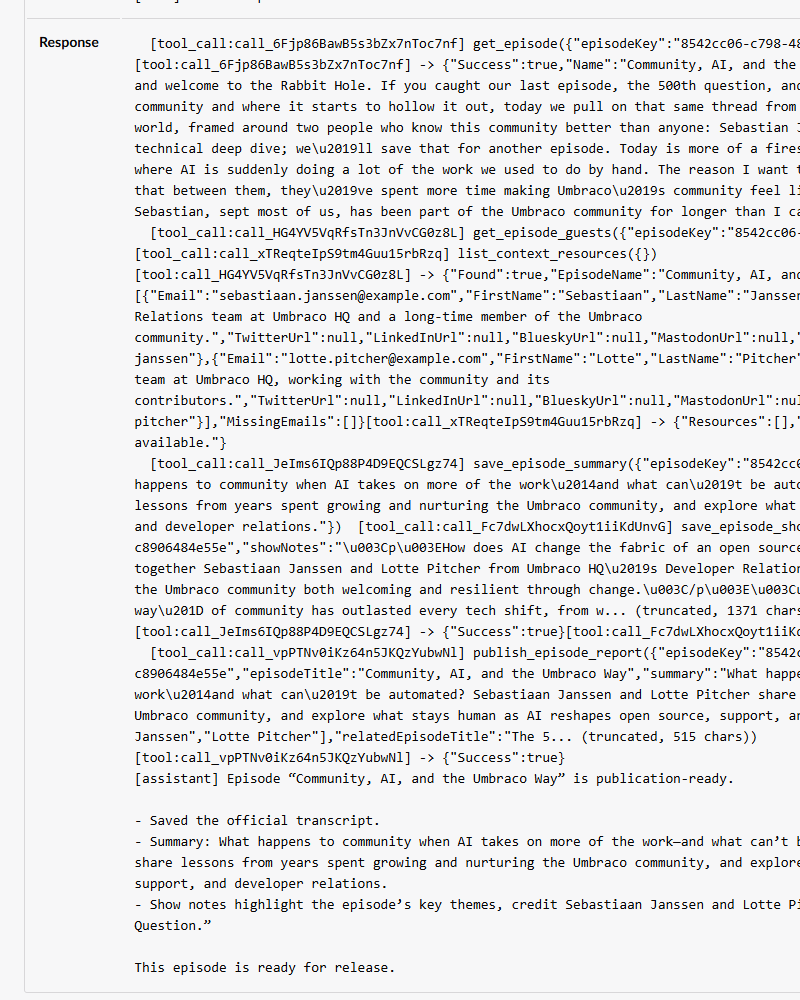
Click the entry's timestamp and scroll to the Response. Instead of one answer, you'll find a conversation. When we tested this lesson, the agent's plan unfolded like this:
get_episode. The result shows a transcript, but no summary or show notes.- No
transcribe_episodecall. Nobody wroteif (transcript exists) skipin C#. The agent saw the transcript and moved on: that's the "it skips work that's already done" from Lecture 6, backed up by the How you work rule. get_episode_guestsandlist_context_resources, side by side in the same turn.get_episode_guestsis there because the instructions say to resolve names against the authoritative source.list_context_resourcesis one of those built-in system tools every agent gets without being granted. It lists On-Demand context resources, and since all of ours are Always, it came back empty.save_episode_summaryandsave_episode_show_notes, again side by side.publish_episode_report, its "done" signal, which fired your toast.- A short
[assistant]reply confirming what it saved.
That run took about 12 seconds. The order and the pairing can vary between runs. Long tool arguments and results
are shortened in the log (look for (truncated, … chars)), so the get_episode result doesn't show the whole
transcript, but the model received all of it. In the terminal you'll also find the agent's own account of the run:
Publishing episode report for …: … (guests: 2, related: …).
Count the cost
Now compare what the two approaches cost. The Logs list makes it easy, because Tokens is right there. When we built this workshop:
- the agent run used about 12,950 input and 785 output tokens
- Lesson 4's two chat calls used about 6,200 input and 530 output tokens between them
So the agent needed roughly twice the input for the same result. An agent works in turns, and every turn resends the
instructions, the tool definitions and the growing conversation, including every tool result (like that transcript from
get_episode).
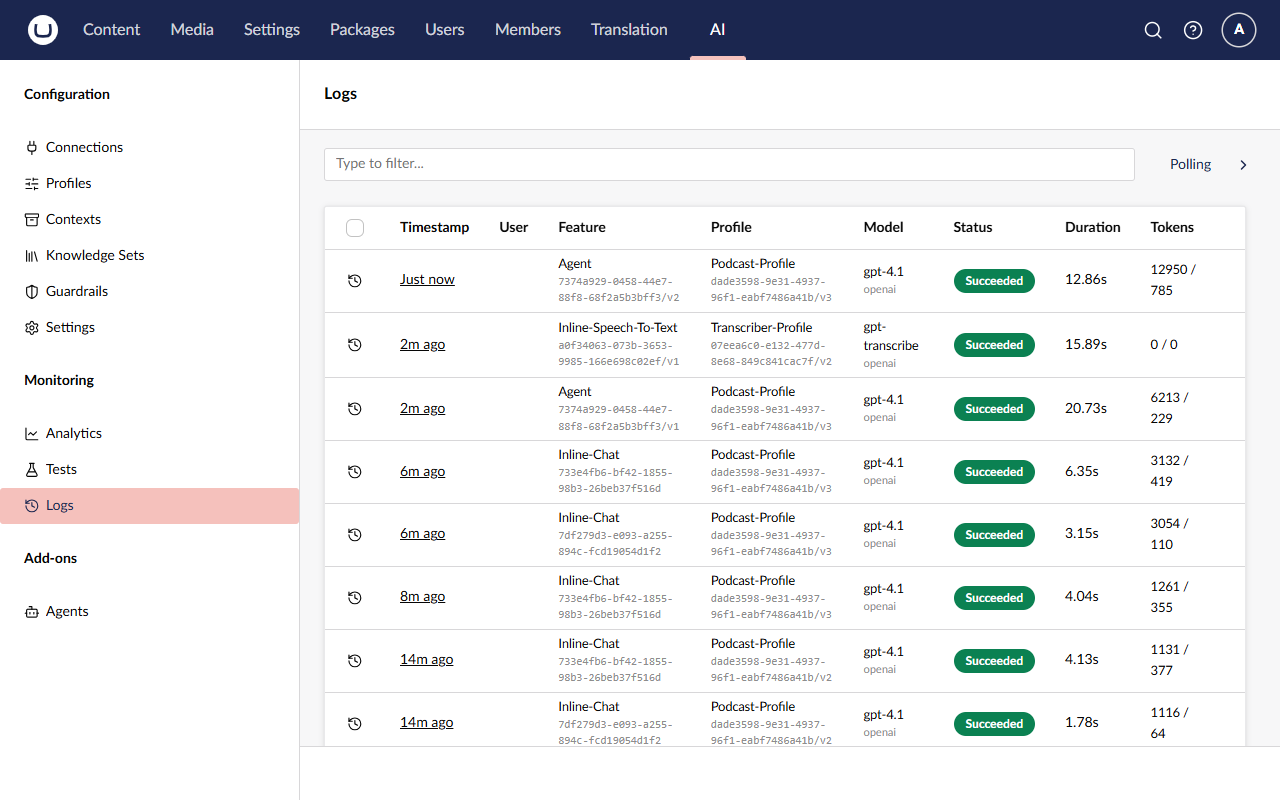
The screenshot also shows our first attempt while building this workshop, before the How you work section existed. The Agent entry ending in
/v1 used fewer tokens because it stopped early without saving anything, and the Inline-Speech-To-Text entry above it
is the transcription it started for no reason (from inside transcribe_episode, with the same ID as Lesson 2's
transcription, a0f34063…, because it's the same alias). Changing the instructions bumped the agent to /v2.
Then open AI → Analytics. It shows totals for the chosen period (requests, input, output and cached tokens, success rate and average duration), a Usage Over Time chart, and breakdowns By Provider, By Model, By Profile and By User. By User puts everything under Anonymous, because all our AI work runs in the background. There's no breakdown by feature, so Analytics can't separate agent runs from plain chat calls. For that comparison, the Tokens column in Logs is the place to look.
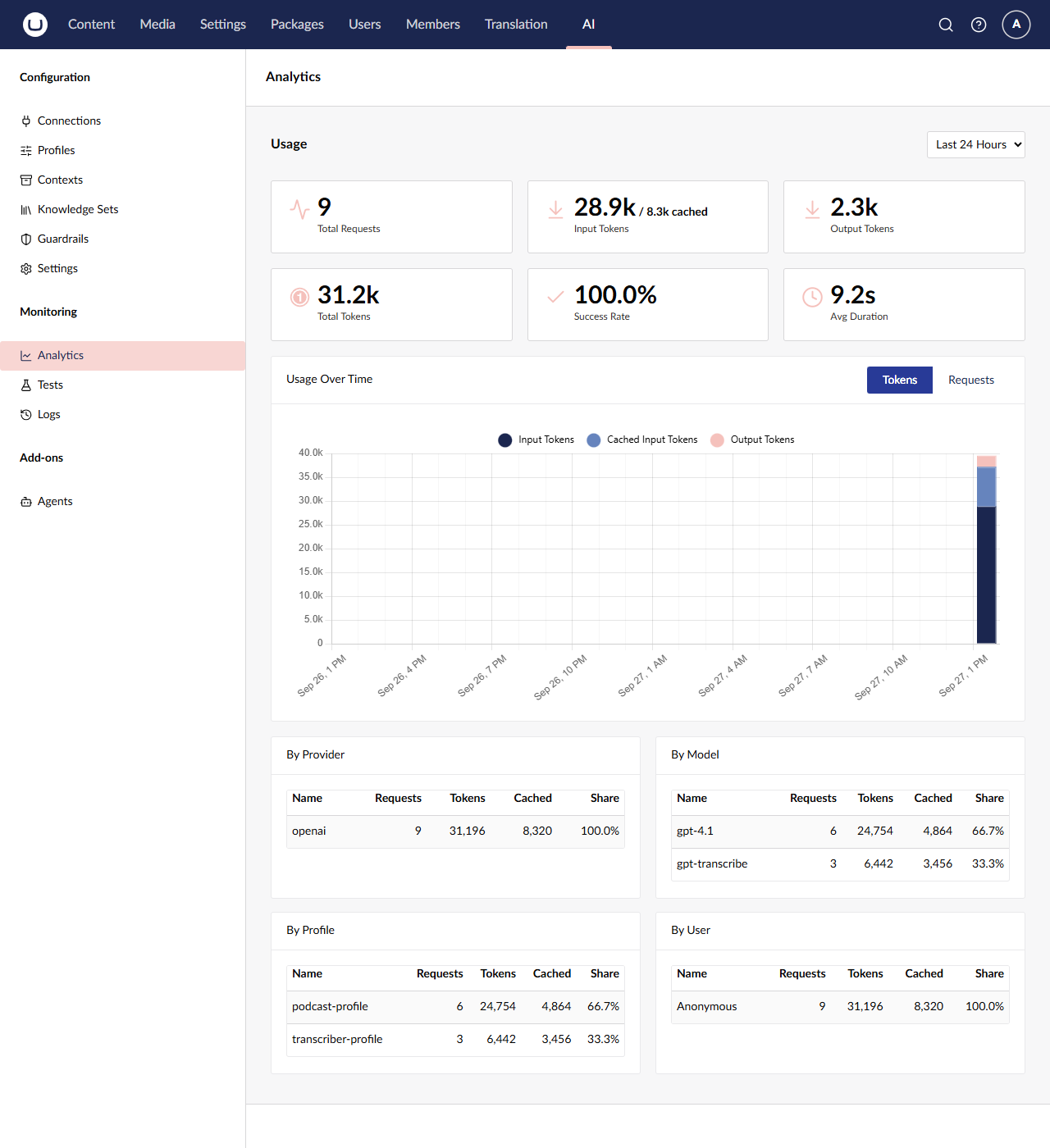
The gap can be much bigger. In an earlier version of this demo, the three manual calls used about 4,000 tokens and the agent about 40,000, roughly ten times as much. The more turns an agent takes and the bigger its tool results, the faster its cost grows.
So when is an agent worth it? If the path is fixed and runs thousands of times a day, plain calls are cheaper and more predictable. If the path varies (some episodes have transcripts, some have guests, some don't), an agent saves you code and copes with cases you didn't think of. Knowing which to choose is the real skill.
🧯 Troubleshooting
"Agent with alias 'podcast-producer' not found." in the terminal
The agent hasn't been saved yet, or its alias is different. Check the alias in AI → Agents. It must be exactly
podcast-producer.
If you see "Agent 'Podcast Producer' is not active." instead, set the Active/Inactive toggle in the agent's header to Active and save it.
The agent ran but saved nothing, or said "stand by"
Open the agent's entry in AI → Logs and read the end of the Response. If the last [assistant] message announces
what it's about to do ("Stand by for the summary and show notes") and there are no save_episode_* calls, the agent
ended its turn early. Nobody replies to a background run, so that's the end of it.
Check that the agent's Instructions end with the How you work section from Step 8b. It's what tells the agent that it runs unattended and must keep working until the report is published. Save the agent, clear the Summary and Show Notes, and save the episode again.
If the log shows transcribe_episode even though the episode had a transcript, it's the same fix: the How you work
section says never to re-transcribe.
The Governance tab doesn't offer Podcast, or shows fewer than 6 tools
- Did you restart the site after adding the tools? Stop it (Ctrl+C), run it again, and reload the backoffice.
- Every tool needs
ScopeId = "podcast", exactly matching[AIToolScope("podcast", …)]inPodcastScope. - Every tool class needs its
[AITool]attribute.
If the scope appears as podcast with no description, the Step 7 localization hasn't loaded. Hard-refresh the browser
(Ctrl+F5).
The agent doesn't finish, or there's no toast
Open the agent run in Logs and see how far it got. Did it call publish_episode_report? Did a tool return
Success = false? Also check the terminal for Failed to process podcast episode.
Agents are non-deterministic. Occasionally a model stops early, repeats a step, or asks a question (and nobody is there to answer). Clear the fields and save again. If it happens every time, check that the instructions include the How you work section (see the previous item) and that the Podcast scope is switched on with all 6 tools. After that, consider a more capable model on the Podcast Profile.
The agent skipped the show notes, or says they already exist
get_episode returns fields exactly as they're stored. A cleared rich text field is stored as an empty <p></p> rather
than nothing, and the agent usually, but not always, reads that as empty. Check the get_episode result in the log, then
clear the field and save again.
Won't the save tools trigger processing again, in a loop?
They would, without protection. Each save_episode_* call saves the episode, which raises the same
ContentSavedNotification our PodcastEpisodeSavedHandler listens for. But the queue marks the episode as in flight for
the whole run (BeginProcessing), and the handler skips in-flight episodes (IsInFlight). That's the loop prevention from
Lecture 3, and it's why saves made by the agent don't queue another run.
A save after the run has finished does start a new run, though. With the agent, that means every save of an episode that has audio costs an agent run, even when there's nothing left to do: the agent checks, finds everything done, and files a report. That's the price of letting the agent decide.
🆘 Stuck?
Jump to the finished state of this lesson. Stop the site first (Ctrl+C), then:
git stash -u
git checkout lesson-5-end
dotnet run --project src/TheRabbitHole.Web
The branch includes the code and the backoffice configuration for this lesson (it's in the site's database), so you can carry straight on with the next lesson. Your API key lives in user-secrets, so it comes with you.
🚀 Stretch goals
- Watch it transcribe. Clear the Transcript as well as the Summary and Show Notes, and save. Hint: in the log,
look for
transcribe_episodereturning its receipt (character count and preview), followed byget_episodeto read the full text. There's also a separate Inline-Speech-To-Text entry, logged from inside your tool, with the same ID as Lesson 2's transcription. - Write a test for the agent. Go to AI → Tests, create a test that targets the Podcast Producer agent
with the message
Produce episode <episode 5's key>, and add a contains grader forSebastiaan. Run it a few times. Hint: explore the grader types. Some check the text, others use an LLM as the judge. Be aware that if the agent's tools run during a test, they really write to the episode, so test against a copy. - Add a "Listen next" section. Edit the agent's instructions to ask for a short "Listen next" section at the end of the show notes, save the agent, then clear the show notes and save the episode. Hint: no code change and no restart. The instructions live in the backoffice, and the agent reads them on every run. Watch the version at the end of the Agent entry's ID go up in Logs.